
Visibility and security: Protecting your cloud infrastructure
Protecting cloud infrastructure: how to connect Azure, AWS and Google Cloud to blacklens.io, detect misconfigurations and check new resources automatically.
- by blacklens.io Team
- Published
- Updated
- 2 min read

As cloud technologies spread, so does the risk of cyber attacks on cloud infrastructure. To counter this trend, we at blacklens.io developed a solution that gives our customers deeper insight into, and more visibility of, their existing and new cloud environments. With cloud scanning in blacklens.io, you can check the security status of your cloud providers, from AWS and Google Cloud to Microsoft Entra and Azure, quickly and easily, and address security issues in a targeted way.
Step by step: set-up and first steps
Setting up a cloud provider is simple. In the integration options, choose Azure, AWS or Google Cloud Platform (GCP). After set-up, you decide whether your assets, such as IP addresses, load balancers and web apps, should be added automatically, and whether you also want to audit existing resources such as IAM and other provider-specific assets.
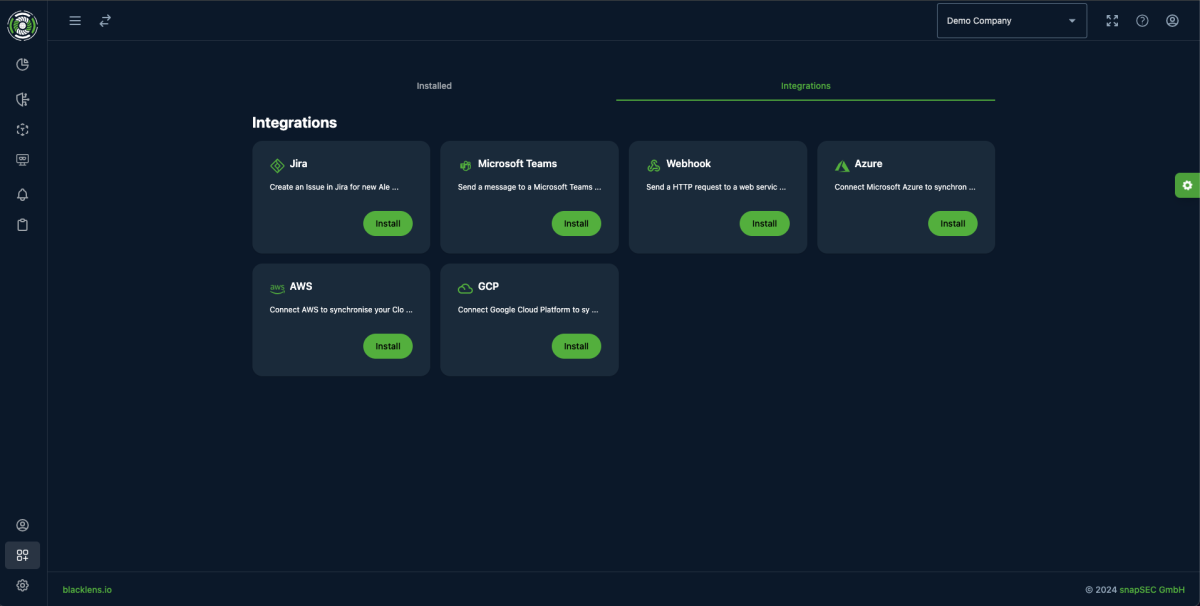
Practical example: cloud auditing of an Azure tenant
In a practical example, we enabled cloud auditing for a Microsoft Azure tenant. Among the first results was a weakness in our own Conditional Access policy. It could have allowed an attacker to bypass the policy and authenticate with a single factor. The weakness was re-checked at short notice and automatically marked as resolved once it had been fixed.
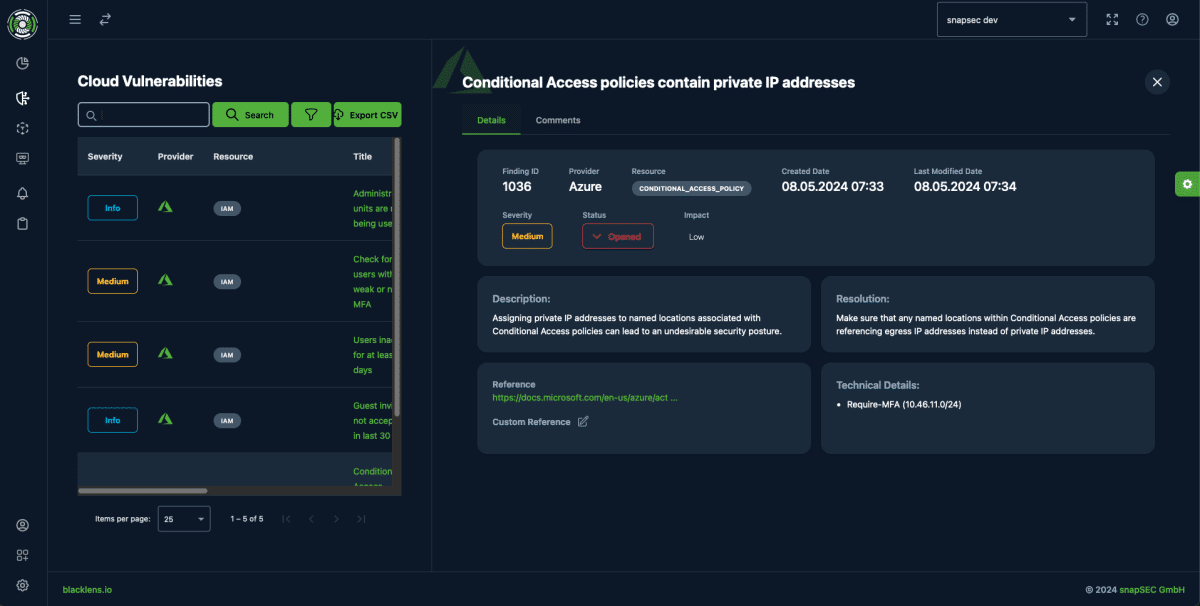
Because blacklens.io continuously scans your cloud environments for new threats and vulnerabilities, security scans are quick to set up. They improve security and support compliance audits at the same time.
Asset synchronisation: automated monitoring of your cloud resources
Asset synchronisation in blacklens.io adds the resources you run in the cloud to the scanning process automatically. The sync runs every 168 hours by default, and Run scan now starts it at any time. Newly created assets, such as virtual machines, load balancers and web apps, are captured automatically, scanned and monitored.
Cloud security as an ongoing task
Security in the cloud remains an ongoing task that calls for a proactive and dynamic approach. Cloud scanning in blacklens.io gives fast, in-depth insight into the security posture of your cloud infrastructure and supports the management and remediation of potential risks. The platform helps you keep the overview and simplify compliance while it continuously monitors your cloud resources for new threats. How cloud scanning helps with NIS2 evidence is covered in the post on unified cloud vulnerability scanning.
Frequently asked questions
- blacklens.io checks the security status of cloud environments in Microsoft Azure, AWS and Google Cloud Platform, as well as Microsoft Entra. You connect them through the platform's integration options. After set-up, you decide whether assets such as IP addresses, load balancers and web apps are added automatically, and whether existing resources such as IAM and other provider-specific assets are audited as well.
More articles
HTTP2Shell: the Brotli flaw reaches far beyond Node.js
HTTP2Shell is not a new flaw but CVE-2026-111497 in any software with a Brotli decoder. Who is affected, and why the version number misleads.
- 5 min read
Node2Shell: why patching Node alone is not enough
Node2Shell exploits a flaw in the Brotli decoder that Node.js bundles. The fix ships in Node 22.23.4, 24.22.1 and 26.12.1 – and in Brotli itself.
- 5 min read
Fortinet hardening release: patching without an advisory
Fortinet shipped critical fixes for FortiOS, FortiManager and FortiAnalyzer on 22 October 2026. The advisories with CVE ids only follow on 10 November.
- 5 min read
See your attack surface within 24 hours.
We set up your workspace and walk you through the first findings.
- 14 days free, all features
- No credit card required
- We walk you through your first findings