
Browser sync: synchronised, compromised, lost
Browser sync carries company passwords, cookies and sessions onto personal devices, where infostealers harvest them. Here is how companies close the gap.
- by blacklens.io Team
- Published
- Updated
- 3 min read
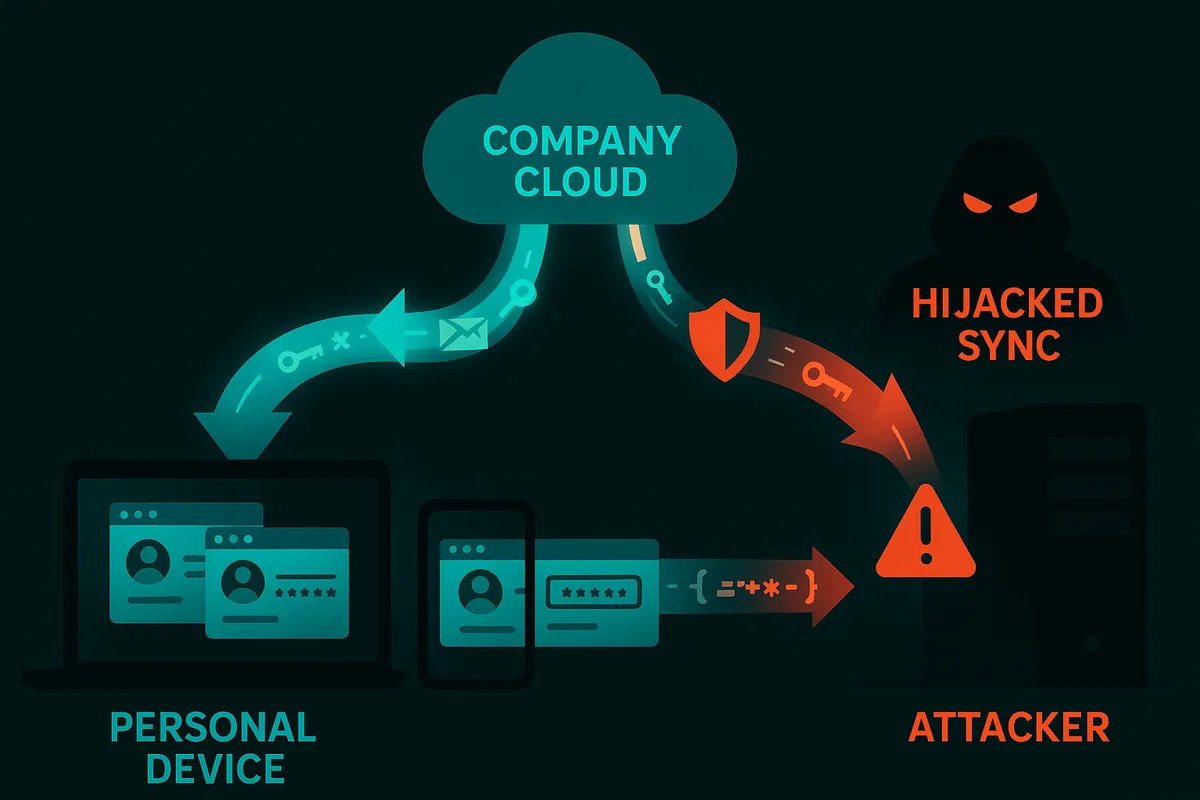
Meant as a convenience feature, it can turn into a security nightmare: browser sync across devices. Through auto-login, saved passwords and bookmarks, sensitive company data moves to personal devices, often completely unnoticed, and from there straight into the hands of attackers.
Browser sync: data exfiltration as a feature
Personal devices are rarely as well protected as company systems: no EDR, no central updates, no forensic monitoring. This is exactly where infostealers come in. This malware quietly siphons off browser data: passwords, cookies, autofill information and saved sessions.
The danger: browser sync transfers this data automatically through accounts such as Google, Microsoft or Firefox Sync, including to personal devices.
As soon as an employee uses Chrome at home with the same account as on the work computer, saved logins and cookies end up in the personal browser profile. A single compromised home PC can be enough to give attackers access to the company.
How attackers harvest browser data despite security mechanisms
Browsers store credentials encrypted, but locally on the system, usually with the user context as the key. Attackers have long known how to get around this:
- Infostealers such as RedLine, Raccoon or LummaC2 use native system APIs to read the browsers' password stores directly.
- Through Chrome's debug flag (
--remote-debugging-port) or manipulated extensions, the browser can sometimes be switched into a debug mode that exposes internal memory and processes, including passwords and sessions.
Stored cookies and tokens enable session hijacking without any password or MFA. Unfortunately, re-authentication is the exception rather than the rule.
The sync function then mirrors the data continuously and unnoticed to the cloud and to every connected device, which is exactly what the attacker benefits from.
The result: a single compromised personal computer is enough to put employee logins, internal portals or accounts with suppliers and trusted customers at risk. It happens completely unnoticed and without a direct attack on the corporate network.
A real example: admin credentials on the dark web
For one customer, logins belonging to an IT service provider were found on the dark web, including administrator accounts.
The cause: a former employee had saved company credentials in his personal Chrome. An infostealer was running unnoticed on his personal device and harvested the browser data. Through Chrome Sync, this data had left the protected company environment, creating a risk for the entire supply chain.
What companies need to do
Browser sync is a convenience feature, but it is also silent data exfiltration in disguise. Companies need to close this door before attackers use it:
- Block sync: through GPO, Intune or comparable policies.
- Disable password saving in the browser: no password store in Chrome, Edge or Firefox for corporate credentials.
- Enforce an enterprise password manager: with MFA, role models and audit trails.
- Monitoring and awareness: educate employees and make the risks visible.
- Implement CIS Benchmarks: for Chrome, Edge and Firefox, including password saving, sync and extension management.
Proactive defence with Dark Web Monitoring
With blacklens.io Dark Web Monitoring, you detect leaked passwords, session cookies and personal data from infostealer logs and combolists, as well as compromised devices with IP address, hostname, operating system, installed antivirus products and infection date. Every finding is automatically assigned to employees or customers, and expired session cookies are archived automatically. If you opt in, the AI assessment rates stolen cookies by name for their session-hijacking risk.
Companies can connect their own processes through the REST API. Alerts also reach the responsible team by e-mail, push notification or integrations such as Jira, ServiceNow, Microsoft Teams or Slack.
Built-in scanners for Azure and Microsoft 365 reveal missing MFA protection and misconfigurations, for targeted and proactive security improvements.
That way a leak becomes an early warning, not a disaster.
Conclusion
Browser sync is convenient, but highly dangerous. Anyone who connects work and personal devices risks invisible data leakage. Only consistent policies, technical hardening and proactive monitoring can stop convenience from leading to compromise.
Security is not the opposite of convenience. It is its precondition.
Frequently asked questions
- Browser sync automatically copies saved passwords, cookies, autofill data and sessions through accounts such as Google, Microsoft or Firefox Sync to every connected device, including personal ones. Personal computers usually have no EDR, no central updates and no forensic monitoring. If an infostealer runs there, corporate credentials go straight to attackers without the company network itself ever being attacked.
More articles
HTTP2Shell: the Brotli flaw reaches far beyond Node.js
HTTP2Shell is not a new flaw but CVE-2026-111497 in any software with a Brotli decoder. Who is affected, and why the version number misleads.
- 5 min read

Node2Shell: why patching Node alone is not enough
Node2Shell exploits a flaw in the Brotli decoder that Node.js bundles. The fix ships in Node 22.23.4, 24.22.1 and 26.12.1 – and in Brotli itself.
- 5 min read
Fortinet hardening release: patching without an advisory
Fortinet shipped critical fixes for FortiOS, FortiManager and FortiAnalyzer on 22 October 2026. The advisories with CVE ids only follow on 10 November.
- 5 min read
See your attack surface within 24 hours.
We set up your workspace and walk you through the first findings.
- 14 days free, all features
- No credit card required
- We walk you through your first findings